
Recap videos: they are a perfect way to tell how God worked in and through an event in sixty seconds or less. Usually, though, they involve more time than they are seemingly worth. They include lots of shots, tons of editing time (and late nights) and sometimes limited feedback and engagement. How do we fix this?
In my own work at Church at The Mill, I’ve found a way of editing recap videos for events that helps me (a) save time, (b) craft better recap videos, and (c) have more time for myself and my other work in the long run. The solution: pre-editing. In this article, I’ll take you through what pre-editing is and how it can help you craft the perfect event recap video for you and your church.
So, what is “pre-editing?” Pre-editing, in my own terms, is spending time before the event editing your recap video. Now, you might be thinking: how can you edit a recap video before the event? Well, I do this in two ways:
- Music. I always have a song picked out before the event kicks off that I know I want to use for a recap video. Usually these are Christian rap songs that I personally listen to that I think would be great to use for a video. I then take the song and use AI beat ripping services to separate the beat from the lyrics, and then use that for the video.
- Shots. I always have shots in my head that I want to use for the recap video. This could be an “opening drone shot,” a “shot of students waving at the camera,” a “shot of signage” or something like that.
An example of a recent recap video I did for our student weekend and some shot ideas I wrote down are below.
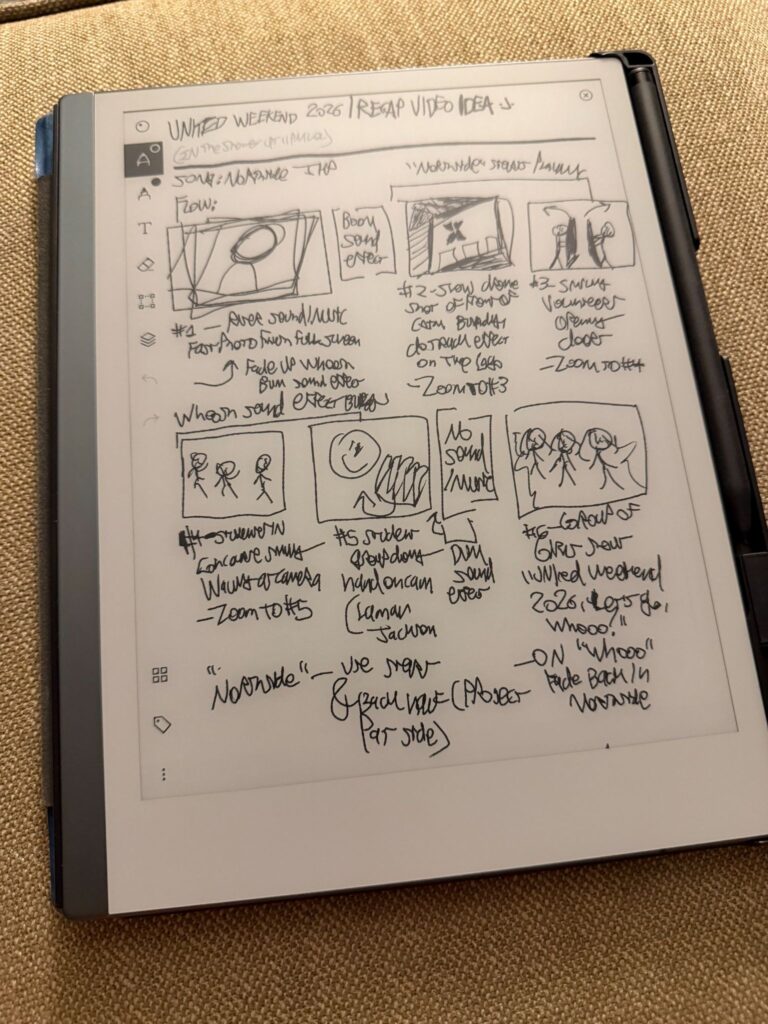
Now, what is the benefit of this? Well, having a shot list in your head before you even shoot helps you shoot better. Having text layers with descriptions of the shots I want in my video editing timeline and also having them in my brain beforehand helps me prioritize getting the shots that I need. The shots in the image above were already in my mind, and I was able to capture them on the first night of the event so I didn’t have to stress about getting them at a later time.
If I have time, I take the song, cut it how I want it, and place placeholder shots that I’ve thought about in my video editing software of choice and then play it through. This shows me what shots (or photos) I need and how to best get these shots.
So, next time you’re thinking about having to edit a recap video for your church’s event, start editing beforehand! Even spending one to two hours “pre-editing” the recap video can save multiple hours and stress during the event, when it would be crunch time on editing. This is a practice that I’ve started since being at Church at The Mill that I truly love and I hope you adopt it into your event coverage process!
Link to the final recap video I talked about above (UNITED WEEKEND 2026)
Questions? Feel free to comment below or send me an email at armaturadot@gmail.com!
Want to download free assets? Check out all of our free church creative assets on the Assets page here.
Check out all of my other creative projects and my freelance creative agency here.
Thank you all for reading and have a blessed rest of your day!
Jonathan Bruce (JBruce)
Creative Producer
Church at The Mill
-Jonathan Bruce (JBruce)
@armaturadot
armaturadot@gmail.com
armaturadot.com